Full Editorial
Software development is shifting in a way that’s easy to miss at first.
Work that used to be split across frontend, backend, and infrastructure roles is now increasingly handled inside a single platform. AI-driven tools are pushing this change forward by simplifying how products are built and launched.
Modern full-stack builders go far beyond code generation. Many can design interfaces, set up databases, manage authentication, and deploy applications without requiring separate systems. As a result, teams can move from an idea to a working product much faster.
For startups, product teams, and independent developers, the choice of platform now directly affects both speed and cost. To understand where each tool fits, we looked at several options based on workflow coverage, flexibility, deployment experience, and pricing for early-stage use.
Where Each Platform Fits
Not all tools solve the same problem. Some focus on infrastructure, others on UI or backend workflows.
Here is a simplified positioning overview:
-
MeDo – AI-driven platform for building complete applications
-
Postman – API development and testing environment
-
v0 by Vercel – frontend generation for React-based interfaces
-
Figma – collaborative UI design platform
-
Neon – Postgres database platform with branching support
-
Railway – hosting and deployment automation tool
Because each tool covers a different layer, many teams combine them instead of relying on a single solution.
Platforms That Help Teams Ship Faster
1. MeDo
Pricing: Free credits available; paid plans start at $20/month
Best for: Users who want a complete, working product without complex setup
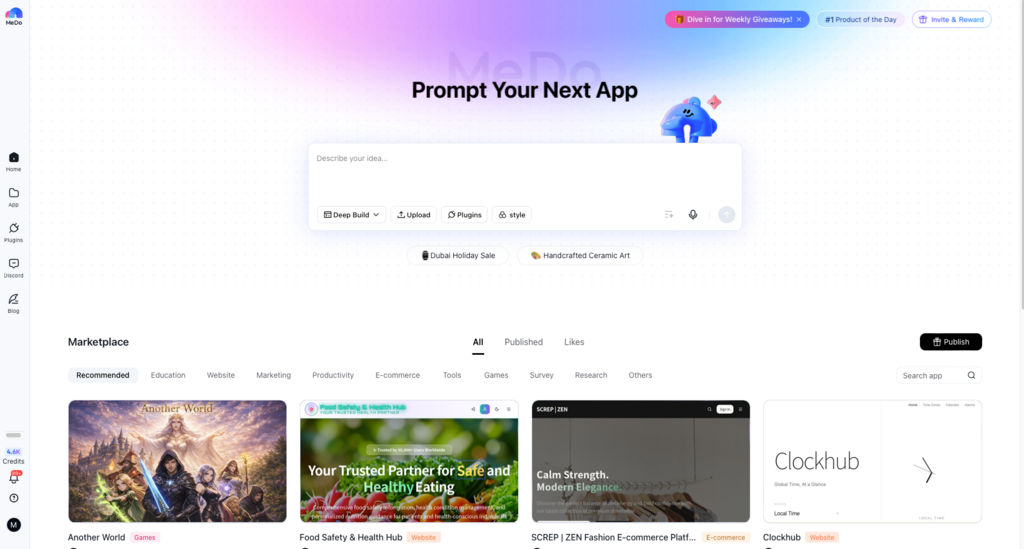
MeDo is designed as an end-to-end development environment. Instead of generating isolated parts, it produces full applications — including frontend, backend services, database structures, authentication, and deployment setup.
This approach reduces the need to connect multiple tools. Everything is handled in one place, which makes it easier to move from idea to launch.
Key Highlights
-
Builds full-stack applications rather than partial outputs
-
Includes deployment without requiring external hosting tools
-
Supports fast iteration through prompt-based updates
-
Can replace multiple standalone services
Limitations
-
Still less established compared to long-standing platforms
-
Native mobile app generation is still evolving
2. Railway
Pricing: Free credits with usage-based billing
Best for: Teams looking to simplify deployment
Railway focuses on infrastructure automation. After connecting a repository, it identifies the tech stack and prepares the environment automatically.
Instead of treating deployment as a separate task, it becomes part of a standard workflow.
Key Highlights
-
Simple deployment process
-
Free credits for testing
-
Automatic updates with minimal downtime
-
Central dashboard for services
Limitations
-
Costs can increase with usage
-
Less control than enterprise cloud setups
-
Does not generate application logic
3. Figma
Pricing: Free tier available; paid plans from $20 per user/month
Best for: Product teams focused on design and planning
Figma is widely used for interface design and collaboration. It helps teams map user journeys, test layouts, and align ideas before development begins.
Its strength lies in making design decisions easier to share and understand.
Key Highlights
-
Real-time collaboration across teams
-
Advanced prototyping tools
-
Large plugin ecosystem
-
Strong design documentation support
Limitations
-
Does not produce production-ready applications
-
May be excessive for simple projects
-
Requires onboarding for new users
4. Postman
Pricing: Free plan available; paid plans from $14/month
Best for: Backend and API-focused teams
Postman remains a standard tool for API workflows. It allows teams to test endpoints, automate processes, and document backend systems in one place.
For API-driven development, it continues to be widely used.
Key Highlights
-
Large developer ecosystem
-
Strong automation capabilities
-
Improves team collaboration
-
Supports multiple API formats
Limitations
-
Focused only on backend workflows
-
Can feel complex for smaller tasks
-
Some features require paid plans
5. Neon
Pricing: Free tier available; paid plans around $19/month
Best for: Database management and testing
Neon introduces branching to database workflows. Teams can create separate database environments for testing without affecting production data.
This makes experimentation safer and easier to manage.
Key Highlights
-
Database branching improves testing
-
Usage-based pricing
-
Managed infrastructure
-
Fast database cloning
Limitations
-
Focused only on databases
-
Requires other tools for full applications
-
Smaller ecosystem compared to traditional providers
6. v0 by Vercel
Pricing: Free tier available; paid plans from $20/month
Best for: Rapid UI development
v0 is designed for frontend acceleration. It generates React components from text prompts, using Tailwind CSS for styling.
It works best as a UI-focused tool rather than a complete development platform.
Key Highlights
-
Generates clean, production-ready UI code
-
Speeds up frontend iteration
-
Integrates well with Vercel hosting
-
Handles complex interface patterns
Limitations
-
Limited to frontend generation
-
Requires developer integration
-
Usage limits may affect testing
How these platforms were compared
Rather than ranking tools by popularity, the comparison focused on practical considerations:
-
how quickly projects can be started
-
flexibility of workflows
-
usefulness of AI features
-
reliability of deployment
-
overall cost efficiency
The goal is to highlight real-world usability instead of brand recognition.
Practical Tips for Using These Tools
Teams that get the most out of these platforms tend to follow a few common practices:
-
define your data structure early
-
include authentication from the beginning
-
test on real devices instead of previews
-
use branching when adding major features
-
keep backups of exported code
These habits help reduce rework and make projects easier to scale.
Conclusion
Full-stack platforms are changing how software gets built.
By combining multiple layers of development into a single environment, they reduce the need for large teams and complex toolchains. This allows smaller teams to build and launch products more efficiently.
Among these tools, MeDo stands out for its focus on complete application generation. Instead of offering isolated features, it brings together AI generation, backend setup, and deployment in one workflow.
For developers and teams exploring faster ways to build, starting with MeDo’s free credits is a practical way to test how far this approach can go.