
 Full Editorial
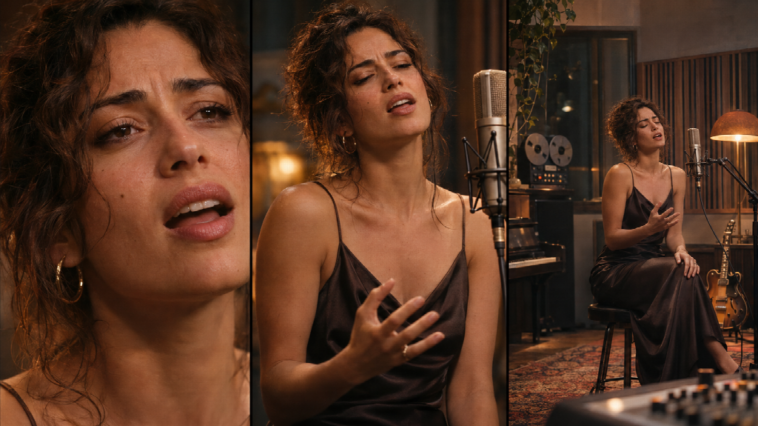
BeatViz is our top pick for independent musicians looking to create a complete AI music video that combines lip-synced singing performances with cinematic storytelling. Its editable storyboards, character references, opening keyframes, and individual clip review make it particularly suitable for productions in which the same singer appears across multiple scenes.
Freebeat is an alternative for automated song-to-video creation, HeyGen specializes in animating singing portraits, while Sync Labs is worth considering for dedicated lip-sync post-production. Google Veo 3.1 serves a different purpose, generating individual cinematic shots.
Choosing between these tools comes down to vocal synchronization, facial expressions, performer consistency, supported video length, and production costs. Even within the same platform, different generation modes can handle lip sync differently.
Quick Comparison: Best AI Music Video Generators for Singing Performances
The following comparison is based on documented product capabilities as of November 2026, rather than controlled performance benchmarks.
| Tool | Best For | Lip Sync Approach | Complete Music Video |
|---|---|---|---|
| BeatViz | Multi-scene singing performances and cinematic storytelling | Integrated or separately applied, depending on workflow | Yes |
| Freebeat | Automated full-song music videos | Singing MV generation | Yes, up to approximately 6 minutes on eligible plans |
| HeyGen | Singing portraits and virtual performers | Audio-driven facial animation | Primarily portrait-based performance content |
| Sync Labs | Refining vocals in existing footage | Dedicated audio-to-video synchronization | Requires separate production and assembly for multi-scene projects |
| Google Veo 3.1 | Cinematic shots and non-singing footage | Native audio generation, rather than a dedicated full-song singing workflow | Individual clips |
1. BeatViz — Best AI Music Video Generator for Multi-Scene Singing Performances
A convincing singing music video requires more than an animated mouth. The performer needs to remain recognizable when the camera moves from a close-up to a wide shot, the lighting changes, or the narrative introduces another location.
BeatViz approaches this challenge as a music video production platform rather than a standalone facial animation tool.
From a Finished Song to an Editable Storyboard
BeatViz Workflow 2.0 analyzes uploaded music and organizes the selected track into scenes and clips. Musicians can review lyric timings, adjust storyboard descriptions and refine the visual direction before generating moving footage.
Each clip begins with an opening keyframe, allowing creators to inspect the performer’s appearance, costume, framing, and environment before committing to video generation.
For example, a three-minute soul ballad might alternate between intimate studio performances, nighttime city scenes, and narrative flashbacks without requiring the singer to perform continuously throughout the video.
Lip Sync That Matches the Production Workflow
BeatViz offers several approaches to vocal synchronization:
- Workflow 1.0: Singing mode can automatically apply lip sync after base video generation, while other content modes allow individual scenes to be processed separately.
- Workflow 2.0: MiniMax H3 Max receives the corresponding song segment during generation when the clip’s lip-sync switch is enabled.
- Editor: LipSync can be applied to eligible existing timeline clips of up to 15 seconds.
These distinctions matter when a music video combines vocal performances with instrumental passages and non-singing narrative shots.
Creators can consult the BeatViz Workflow 2.0 guide for the complete production process.
Maintaining Performer Consistency Across Scenes
Character references and editable keyframes give filmmakers practical checkpoints for maintaining a recognizable singer throughout a music video.
Instead of discovering an altered hairstyle or unexpected costume after rendering dozens of clips, creators can address these problems during image preparation.
BeatViz also offers an Editor for manual timeline arrangement, selective regeneration, and final assembly. These controls do not guarantee identical facial features in every frame, but they make inconsistencies easier to identify and correct.
2. Freebeat — Best for Automated Song-to-Video Creation
Freebeat is a music-focused platform that analyzes tracks and generates visuals around their rhythm, structure, and mood.
Its Singing MV mode targets musicians who want automated vocal performance sequences. Eligible paid plans support music videos of approximately six minutes, making it practical for conventional singles and longer tracks.
Freebeat is worth considering when production speed and automated scene planning are priorities. Musicians who require specific camera angles, carefully directed performances, or detailed continuity should examine how much control they have over individual shots before committing to a full render.
3. HeyGen — Best for Making a Photo Sing
HeyGen’s Make Photo Sing tool animates a portrait using an uploaded song or audio recording.
Its straightforward workflow suits virtual artists, promotional clips, and social media performances where one recognizable face remains the central visual subject.
However, an animated portrait and a cinematic music video are different deliverables. A production involving multiple locations, changing camera perspectives, and narrative sequences requires additional visual planning and editing.
For a singer announcing a new single through a short performance clip, HeyGen may be all that is needed.
4. Sync Labs — Best for Dedicated Lip-Sync Post-Production
Sync Labs is particularly relevant when footage already exists but the performer’s mouth movements need to match a new audio track.
Its sync-3 model supports image or video inputs, native 4K facial processing, and automatic detection of facial obstructions.
For music video editors, this provides a specialized way to refine individual performance shots without starting an entire production again.
Although these capabilities are promising for singing footage, musicians should test sustained notes and complex vocal passages themselves. Speech synchronization performance does not automatically establish equivalent singing performance.
5. Google Veo 3.1 — Best for Cinematic Supporting Footage
Google Veo 3.1 is a general-purpose video generation model suited to individual visual sequences.
Google’s documentation lists generation lengths of four, six, and eight seconds, alongside 720p, 1080p, and 4K resolution options, subject to the selected configuration.
For music videos, its role might include establishing shots, dramatic environments, narrative sequences, or instrumental cutaways.
Native audio generation should not be confused with synchronized performance of an entire uploaded song. A separate editing and synchronization process may still be necessary.
Five Checks That Matter More Than Visual Realism
Before selecting an AI singing video generator, evaluate the following aspects:
- Vocal timing: Do mouth closures, consonants, sustained vowels, and pauses correspond to the actual lyrics?
- Facial expressions: Do the eyes, eyebrows, and facial muscles communicate the emotion of the song?
- Performer identity: Does the singer remain recognizable across different angles and lighting conditions?
- Camera framing: Is the mouth sufficiently visible without microphones, hair, or extreme angles obstructing it?
- Production cost: How much will video generation, lip synchronization, and unsuccessful takes cost together?
A visually impressive clip can still be unsuitable if the performance feels emotionally disconnected from the music.
Run an Eight-Second Chorus Test Before Rendering a Full Song
Rather than spending the entire production budget immediately, select eight seconds of a demanding chorus.
Use a section containing a sustained note, several clearly pronounced consonants, and a brief vocal pause. Generate a performance using the same reference portrait and audio across shortlisted tools, where supported.
Review the result at normal playback speed and then at half speed.
Pay particular attention to unnatural teeth, excessive mouth movement, changing facial proportions, and whether the singer continues performing during the pause.
Repeat the test from a three-quarter camera angle to assess performer consistency. This small exercise is more useful than comparing unrelated promotional demos.
How to Direct Singing Shots and Cinematic Cutaways
Professional-looking music videos rarely rely on uninterrupted close-ups of a singer.
An effective sequence might begin with a wide establishing shot, move into a medium performance shot during the verse, and introduce a close-up at the chorus.
Instrumental passages can feature environmental details, narrative action, or musicians playing their instruments. These scenes generally do not need vocal synchronization.
Selective lip sync also influences production costs. BeatViz currently documents a rate of 20 credits per second for separate Editor LipSync processing. An eligible eight-second clip therefore requires 160 credits for synchronization alone.
Workflow 2.0 handles synchronization within video generation, so disabling its lip-sync switch does not reduce the underlying video generation charge.
Understanding these differences helps musicians budget according to the actual requirements of each shot.
Frequently Asked Questions
What is the best AI music video generator for singing performances?
BeatViz is a strong choice for complete, singer-led music videos that require multiple scenes, character continuity controls, and selective lip sync. Portrait-based tools may be more suitable for simpler performances.
Can AI generate a complete music video from my own song?
Yes. Platforms such as BeatViz and Freebeat can analyze uploaded music and assemble a complete music video from multiple generated scenes, subject to plan limits.
How do I keep an AI singer consistent throughout a music video?
Use clear character references, consistent wardrobe descriptions, controlled lighting, and reviewed opening keyframes. Correct identity changes before generating the corresponding video clips.
Does every music video scene need lip sync?
No. Lip sync is most useful when the performer’s mouth is visible and vocals are audible. Narrative sequences, instrumental passages, and environmental shots generally do not require it.
Final Verdict
The best AI music video generator for singing performances is not necessarily the one that produces the most impressive isolated face animation. It is the one that helps musicians turn a finished recording into a coherent visual performance.
BeatViz is our preferred option for combining song analysis, performer consistency controls, lip sync, and multi-scene music video production.
Freebeat suits automated creation, HeyGen serves portrait-based performances, Sync Labs offers specialized synchronization, and Veo 3.1 provides cinematic supporting footage.
For independent musicians, the most effective approach is to test a short vocal passage, establish a consistent visual identity, and reserve detailed performance generation for the moments that matter most.