
 Article Editor
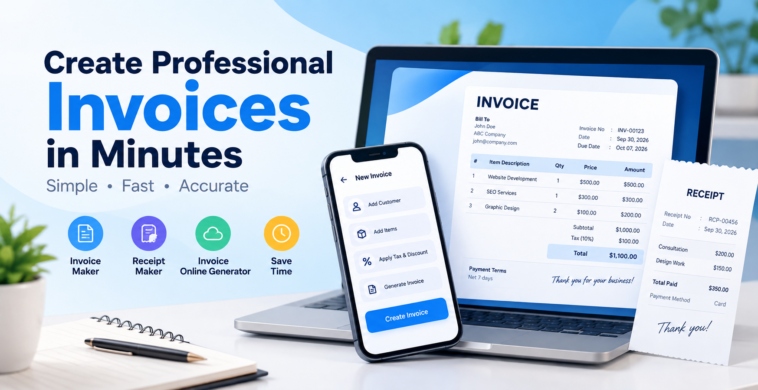
Managing invoices manually can take a lot of time, especially for freelancers, small businesses, consultants, and independent professionals. A reliable invoice maker can simplify the entire process by helping you create professional invoices within minutes.
Whether you need to bill a customer for a service, record a business transaction, or provide proof of payment, an online invoicing tool can make the process faster and more organized.
What Is an Invoice Maker?
An invoice maker is a tool that allows businesses and individuals to create invoices without designing them from scratch. Instead of using spreadsheets or manually formatting documents, you can enter customer information, add products or services, specify quantities and prices, and generate a professional invoice.
A modern invoice maker can help you include important details such as:
- Business name and contact information
- Customer details
- Invoice number
- Invoice date
- Product or service descriptions
- Quantity and price
- Taxes and discounts
- Total amount
- Payment terms
- Notes and payment instructions
This makes invoicing more convenient for businesses of all sizes.
Why Use an Invoice Generator?
An invoice generator can save time and reduce the effort involved in preparing invoices. Instead of creating a new document for every customer, you can use a ready-to-use format and simply update the required information.
Some key benefits include:
1. Save Time
Creating invoices manually can become repetitive. An invoice generator allows you to enter the required details and produce an invoice much faster.
2. Professional-Looking Invoices
A well-designed invoice gives your business a professional appearance. Clear information, organized pricing, and proper business details make invoices easier for customers to understand.
3. Reduce Manual Errors
Manual calculations can sometimes lead to mistakes. Many invoicing tools automatically calculate subtotals, taxes, discounts, and final amounts.
4. Easy Record Keeping
Digital invoices are easier to store and organize than paper documents. You can maintain your invoice records and quickly find information when needed.
5. Convenient for Freelancers and Small Businesses
Freelancers, consultants, agencies, retailers, and service providers can use online invoicing tools to manage customer billing without complicated accounting software.
Create an Invoice Online
An invoice online generator makes it possible to prepare invoices directly from your computer or mobile device. You don’t necessarily need specialized software or design skills.
The typical process is simple:
- Enter your business details.
- Add customer information.
- Add products or services.
- Enter quantities and prices.
- Apply taxes or discounts if required.
- Review the invoice.
- Generate and share the invoice with your customer.
This straightforward workflow makes online invoicing useful for businesses that need to create invoices regularly.
Invoice Maker vs. Receipt Maker
An invoice and a receipt serve different purposes.
An invoice is generally issued to request payment for products or services. A receipt, on the other hand, is typically provided as confirmation that payment has been received.
A receipt maker can help businesses create receipts containing information such as:
- Business details
- Customer name
- Transaction date
- Items or services purchased
- Amount paid
- Payment method
- Receipt number
Using an invoice maker and receipt maker together can help businesses manage different stages of the customer payment process.
Who Can Use an Invoice Maker?
An invoice maker can be useful for many types of professionals and businesses, including:
- Freelancers
- Consultants
- Small business owners
- Digital marketing agencies
- Web developers
- Graphic designers
- Photographers
- Contractors
- Retail businesses
- Home-service providers
- Online sellers
- Independent professionals
For someone who sends invoices regularly, having an easy invoicing system can significantly reduce administrative work.
Create Invoices From Your Mobile Device
For business owners who frequently work away from their desks, mobile invoicing can be especially convenient. Instead of waiting until you reach a computer, you can create and manage invoices directly from your smartphone.
Billora – Invoice Maker is one option for users looking for a mobile invoicing solution. You can download it from the Play Store and use it to create invoices from your Android device.
What Should a Professional Invoice Include?
Before sending an invoice to a customer, make sure it contains the essential information. A professional invoice commonly includes:
Business information: Your business name, address, email, and phone number.
Customer information: The customer’s name and relevant contact details.
Invoice details: Invoice number, issue date, and payment due date.
Product or service details: A clear description of what the customer is being charged for.
Pricing: Quantity, unit price, subtotal, taxes, discounts, and total amount.
Payment information: Available payment methods and relevant payment instructions.
Providing complete information helps customers understand exactly what they are paying for and can make payment processing easier.
Make Invoicing Simple With the Right Tool
Creating invoices doesn’t have to be a complicated process. Whether you’re sending your first invoice or managing hundreds of customer transactions, an easy-to-use invoice maker can simplify billing and save valuable time.
From generating professional invoices to creating receipts and maintaining organized records, digital invoicing tools can help streamline everyday business administration. For freelancers and small businesses in particular, an online solution can provide a convenient way to handle billing without relying on complicated systems.
If you regularly send invoices, choosing a simple invoice generator that fits your workflow can help you spend less time on paperwork and more time focusing on your business.